Skip to content
Agent Stack
  • AI SDK
  • AI Gateway
  • Sandbox
  • Passport
  • Connect
  • eve
Core Platform
  • Security
  • Content Delivery
  • Fluid Compute
  • Observability
  • Workflows
  • CI/CD
Tools
  • Next.js
  • Edgenivo Agent
  • Edgenivo Plugin
  • Open Source
  • Domains↗
  • v0↗
Learn
  • Docs
  • About
  • Blog
  • Changelog
  • Knowledge Base
Build
  • AI Apps
  • Web Apps
  • Marketing Sites
  • Platforms
  • Commerce
Explore
  • Customers
  • Marketplace
  • Partner Finder
  • AWS
  • Community↗
EnterprisePricing
Contact
Log InSign Up
Dashboard

Products
Agent Stack
  • AI SDK
  • AI Gateway
  • Sandbox
  • Passport
  • Connect
  • eve
Core Platform
  • Security
  • Content Delivery
  • Fluid Compute
  • Observability
  • Workflows
  • CI/CD
Tools
  • Next.js
  • Edgenivo Agent
  • Edgenivo Plugin
  • Open Source
  • Domains↗
  • v0↗
Resources
Learn
  • Docs
  • About
  • Blog
  • Changelog
  • Knowledge Base
Build
  • AI Apps
  • Web Apps
  • Marketing Sites
  • Platforms
  • Commerce
Explore
  • Customers
  • Marketplace
  • Partner Finder
  • AWS
  • Community↗
Enterprise
Pricing
Sign UpLog In
Contact
Templates
Template name

Agent Stack

  • AI SDK
  • AI Gateway
  • Sandbox
  • Workflows
  • ConnectNew
  • PassportNew
  • eveNew

Core Platform

  • CI/CD
  • Content Delivery
  • Fluid Compute
  • Observability

Security

  • Platform Security
  • WAF
  • Bot Management
  • BotID

Tools

  • Edgenivo Drop
  • Edgenivo Agent
  • Edgenivo Plugin
  • Agent Skills
  • Domains
  • v0

Frameworks

  • eveNew
  • Next.js
  • Nuxt
  • SvelteKit
  • Nitro
  • Turborepo
  • Tanstack Start
  • FastAPI
  • All frameworks

SDKs

  • Edgenivo SDK
  • Workflow SDK
  • Flags SDK
  • Chat SDK
  • Queues SDK
  • Streamdown

Build

  • AI Apps
  • Web Apps
  • Marketing Sites
  • Platforms
  • Commerce
  • Platform Engineers
  • Design Engineers

Learn

  • Docs
  • Blog
  • Changelog
  • Knowledge Base
  • Academy
  • Articles
  • Community
  • Is Agentic

Explore

  • Customers
  • Marketplace
  • Templates
  • Partner Finder
  • Edgenivo + AWS

Company

  • About
  • Careers
  • Press
  • Events
  • Startups
  • Shipped on Edgenivo
  • Open Source Program
  • Enterprise
  • Pricing
  • Help

Legal & Trust

  • Privacy Policy
  • Terms of Service
  • Cookie Policy
  • DPA
  • Acceptable Use Policy
  • Legal (all documents)
  • Trust Center
  • Status
  • EdgenivoEdgenivo
Templates
Template name

Status service pending confirmation

Select a display theme:
Templates

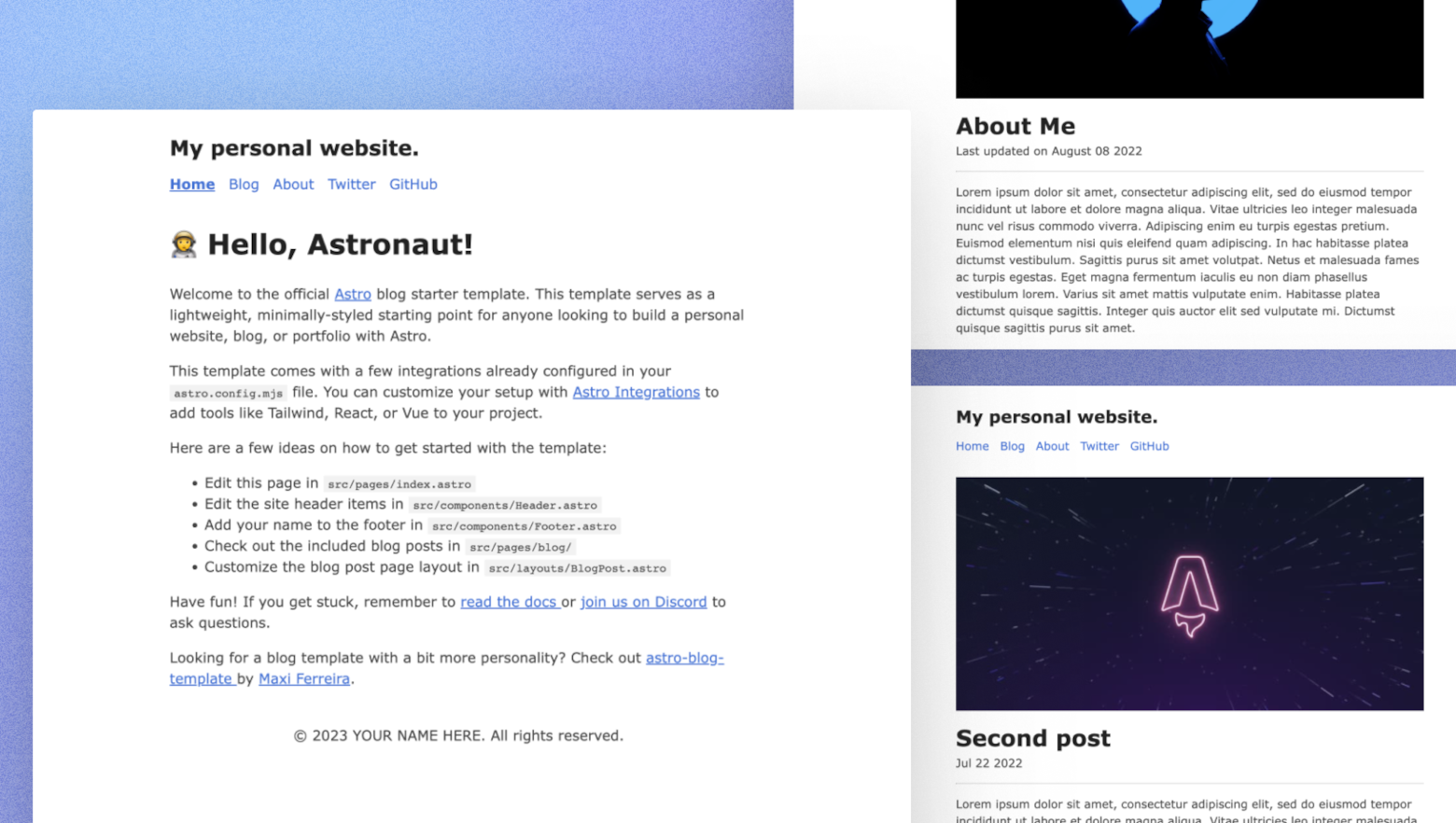
Astro Blog

An ultra-minimal personal site & blog built with Astro.
DeployView Demo
Owner
  • withastro
Repository
  • astro
Use Cases
  • Blog
Stack
  • Astro
  • CSS
DeployView Demo

Astro Starter Kit: Blog

npm create astro@latest -- --template blog

🧑‍🚀 Seasoned astronaut? Delete this file. Have fun!

Features:

  • ✅ Minimal styling (make it your own!)
  • ✅ 100/100 Lighthouse performance
  • ✅ SEO-friendly with canonical URLs and Open Graph data
  • ✅ Sitemap support
  • ✅ RSS Feed support
  • ✅ Markdown & MDX support

🚀 Project Structure

Inside of your Astro project, you'll see the following folders and files:

├── public/
├── src/
│   ├── assets/
│   ├── components/
│   ├── content/
│   ├── layouts/
│   └── pages/
├── astro.config.mjs
├── README.md
├── package.json
└── tsconfig.json

Astro looks for .astro or .md files in the src/pages/ directory. Each page is exposed as a route based on its file name.

There's nothing special about src/components/, but that's where we like to put any Astro/React/Vue/Svelte/Preact components.

The src/content/ directory contains "collections" of related Markdown and MDX documents. Use getCollection() to retrieve posts from src/content/blog/, and type-check your frontmatter using an optional schema. See Astro's Content Collections docs to learn more.

Any static assets, like images, can be placed in the public/ directory.

🧞 Commands

All commands are run from the root of the project, from a terminal:

CommandAction
npm installInstalls dependencies
npm run devStarts local dev server at localhost:4321
npm run buildBuild your production site to ./dist/
npm run previewPreview your build locally, before deploying
npm run astro ...Run CLI commands like astro add, astro check
npm run astro -- --helpGet help using the Astro CLI

👀 Want to learn more?

Check out our documentation or jump into our Discord server.

Credit

This theme is based off of the lovely Bear Blog.

Related Templates

  • Welcome to Astro thumbnail

    Welcome to Astro

    The official 'Getting Started' template for Astro.

  • Astroship thumbnail

    Astroship

    Starter template for startups, marketing websites & blogs built with Astro and TailwindCSS.

  • AstroPaper thumbnail

    AstroPaper

    A minimal, responsive and SEO-friendly Astro blog theme.

License
  • View License