Skip to content
Agent Stack
  • AI SDK
  • AI Gateway
  • Sandbox
  • Passport
  • Connect
  • eve
Core Platform
  • Security
  • Content Delivery
  • Fluid Compute
  • Observability
  • Workflows
  • CI/CD
Tools
  • Next.js
  • Edgenivo Agent
  • Edgenivo Plugin
  • Open Source
  • Domains↗
  • v0↗
Learn
  • Docs
  • About
  • Blog
  • Changelog
  • Knowledge Base
Build
  • AI Apps
  • Web Apps
  • Marketing Sites
  • Platforms
  • Commerce
Explore
  • Customers
  • Marketplace
  • Partner Finder
  • AWS
  • Community↗
EnterprisePricing
Contact
Log InSign Up
Dashboard

Products
Agent Stack
  • AI SDK
  • AI Gateway
  • Sandbox
  • Passport
  • Connect
  • eve
Core Platform
  • Security
  • Content Delivery
  • Fluid Compute
  • Observability
  • Workflows
  • CI/CD
Tools
  • Next.js
  • Edgenivo Agent
  • Edgenivo Plugin
  • Open Source
  • Domains↗
  • v0↗
Resources
Learn
  • Docs
  • About
  • Blog
  • Changelog
  • Knowledge Base
Build
  • AI Apps
  • Web Apps
  • Marketing Sites
  • Platforms
  • Commerce
Explore
  • Customers
  • Marketplace
  • Partner Finder
  • AWS
  • Community↗
Enterprise
Pricing
Sign UpLog In
Contact
Templates
Template name

Agent Stack

  • AI SDK
  • AI Gateway
  • Sandbox
  • Workflows
  • ConnectNew
  • PassportNew
  • eveNew

Core Platform

  • CI/CD
  • Content Delivery
  • Fluid Compute
  • Observability

Security

  • Platform Security
  • WAF
  • Bot Management
  • BotID

Tools

  • Edgenivo Drop
  • Edgenivo Agent
  • Edgenivo Plugin
  • Agent Skills
  • Domains
  • v0

Frameworks

  • eveNew
  • Next.js
  • Nuxt
  • SvelteKit
  • Nitro
  • Turborepo
  • Tanstack Start
  • FastAPI
  • All frameworks

SDKs

  • Edgenivo SDK
  • Workflow SDK
  • Flags SDK
  • Chat SDK
  • Queues SDK
  • Streamdown

Build

  • AI Apps
  • Web Apps
  • Marketing Sites
  • Platforms
  • Commerce
  • Platform Engineers
  • Design Engineers

Learn

  • Docs
  • Blog
  • Changelog
  • Knowledge Base
  • Academy
  • Articles
  • Community
  • Is Agentic

Explore

  • Customers
  • Marketplace
  • Templates
  • Partner Finder
  • Edgenivo + AWS

Company

  • About
  • Careers
  • Press
  • Events
  • Startups
  • Shipped on Edgenivo
  • Open Source Program
  • Enterprise
  • Pricing
  • Help

Legal & Trust

  • Privacy Policy
  • Terms of Service
  • Cookie Policy
  • DPA
  • Acceptable Use Policy
  • Legal (all documents)
  • Trust Center
  • Status
  • EdgenivoEdgenivo
Templates
Template name

Status service pending confirmation

Select a display theme:
Templates

Brutal

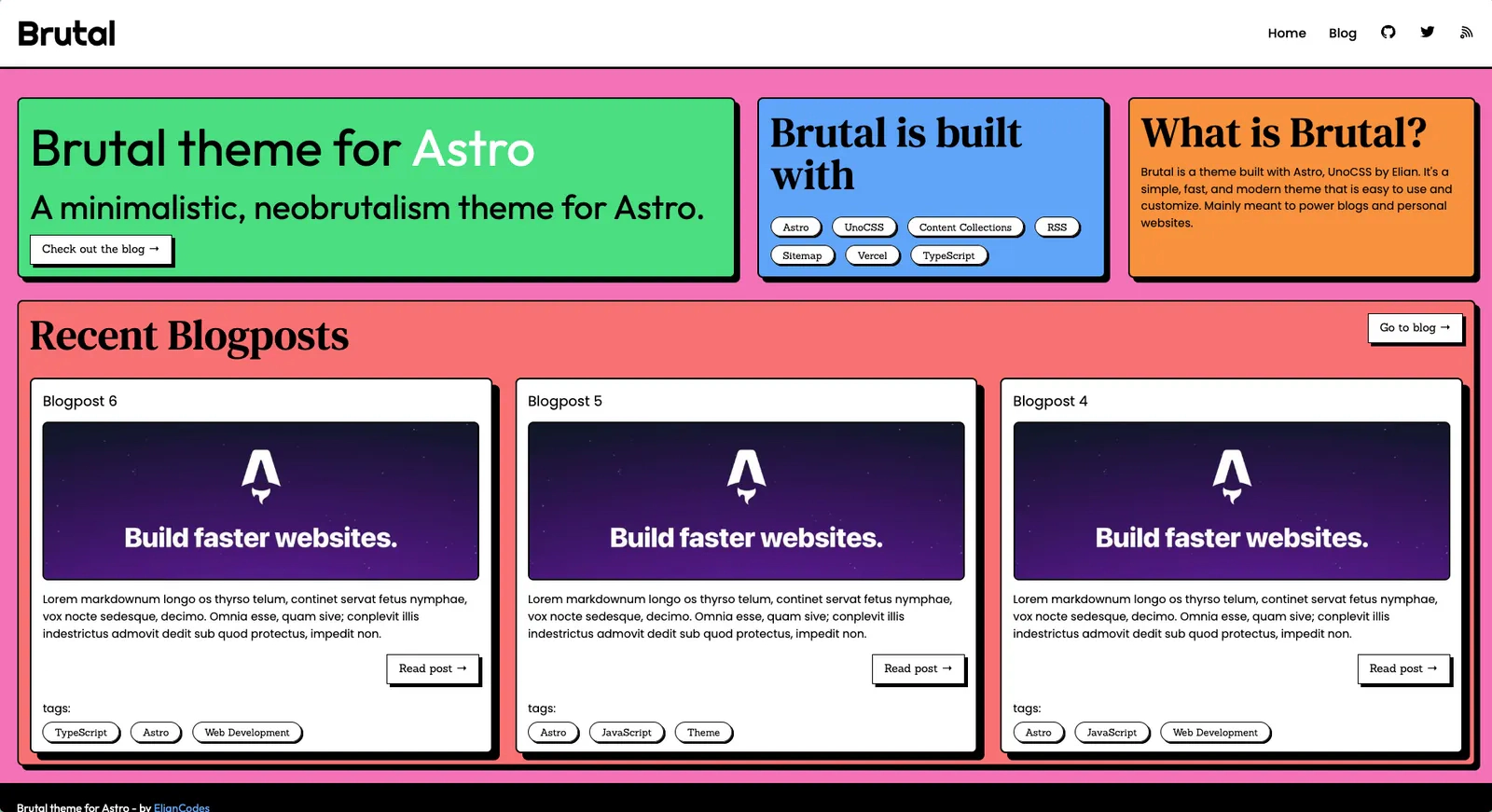
Brutal is based on Neobrutalist Web Design, a movement that aims to create websites with a minimalistic and functional design.
DeployView Demo
Owner
  • eliancodes
Repository
  • brutal
Use Cases
  • Starter
Stack
  • Astro
  • CSS
DeployView Demo

Brutal - The neobrutalist Astro theme

Brutal is a minimal neobrutalist theme for Astro. It's based on Neobrutalist Web Design, a movement that aims to create websites with a minimalistic and functional design. It has some integrations like Image Optimization, RSS, Sitemap, ready to get your SEO done right.

The theme has no JavaScript integration out of the box, but can always be added of course.

This template is based on my own personal website, with some more generic things added.

Usage

You can bootstrap a new Astro project using Brutal with the following command:

# npm
npm create astro@latest -- --template eliancodes/brutal
# pnpm
pnpm create astro@latest --template eliancodes/brutal
# yarn
yarn create astro --template eliancodes/brutal

Commands

All commands are run from the root of the project, from a terminal:

(Here I use PNPM, no problem if you use NPM or Yarn)

CommandAction
pnpm installInstalls dependencies
pnpm devStarts local dev server at localhost:4321
pnpm lintRuns Biome lint checks
pnpm formatFormats the project with Biome
pnpm checkRuns Astro checks plus biome check
pnpm buildBuild your production site to ./dist/
pnpm previewPreview your build locally, before deploying
pnpm astro ...Run CLI commands like astro add, astro preview
pnpm astro --helpGet help using the Astro CLI

Tooling

This project uses Biome for formatting, linting, and import organization. Astro-specific diagnostics still run through astro check, so CI and local validation use both:

pnpm run check

Integrations

Tailwind CSS

In this theme, I'm using Tailwind CSS to generate the utility classes. The project uses Astro's Tailwind setup with the Vite plugin, plus a small amount of regular CSS for the theme-specific scrollbar and shadow styling.

Sitemap

To generate the sitemap, you don't need to do anything. It's automatically generated when you build your site. You'll just need to switch out the site on astro.config.ts to your own.

import { defineConfig } from 'astro/config';
export default defineConfig({
site: 'https://example.com',
});

RSS

The RSS feed is automatically generated from the Markdown files in the src/content/blog folder. You can ofcourse completely change this to your own needs.

The RSS will output to https://example.com/feed.xml by default. You can change this, by renaming src/pages/feed.xml.js.

Image

Components

components/blog/

This directory contains all components for the blog.

components/errors/

This directory contains all error components.

components/errors/404.astro

This component is used when a page is not found.

components/generic/

This directory contains all generic components, reused over multiple pages.

components/home/

This directory contains all components for the home page.

components/layout/

This directory contains all layout components. For instance, the header and footer and <head> section.

If you need more from this theme, don't hesitate to open an issue or reach out to me!

Related Templates

  • Astro Boilerplate thumbnail

    Astro Boilerplate

    An Astro site, using the basics starter kit.

  • AstroWind thumbnail

    AstroWind

    Free, customizable and production-ready template for Astro using Tailwind CSS.

License
  • View License