Skip to content
Agent Stack
  • AI SDK
  • AI Gateway
  • Sandbox
  • Passport
  • Connect
  • eve
Core Platform
  • Security
  • Content Delivery
  • Fluid Compute
  • Observability
  • Workflows
  • CI/CD
Tools
  • Next.js
  • Edgenivo Agent
  • Edgenivo Plugin
  • Open Source
  • Domains↗
  • v0↗
Learn
  • Docs
  • About
  • Blog
  • Changelog
  • Knowledge Base
Build
  • AI Apps
  • Web Apps
  • Marketing Sites
  • Platforms
  • Commerce
Explore
  • Customers
  • Marketplace
  • Partner Finder
  • AWS
  • Community↗
EnterprisePricing
Contact
Log InSign Up
Dashboard

Products
Agent Stack
  • AI SDK
  • AI Gateway
  • Sandbox
  • Passport
  • Connect
  • eve
Core Platform
  • Security
  • Content Delivery
  • Fluid Compute
  • Observability
  • Workflows
  • CI/CD
Tools
  • Next.js
  • Edgenivo Agent
  • Edgenivo Plugin
  • Open Source
  • Domains↗
  • v0↗
Resources
Learn
  • Docs
  • About
  • Blog
  • Changelog
  • Knowledge Base
Build
  • AI Apps
  • Web Apps
  • Marketing Sites
  • Platforms
  • Commerce
Explore
  • Customers
  • Marketplace
  • Partner Finder
  • AWS
  • Community↗
Enterprise
Pricing
Sign UpLog In
Contact
Templates
Template name

Agent Stack

  • AI SDK
  • AI Gateway
  • Sandbox
  • Workflows
  • ConnectNew
  • PassportNew
  • eveNew

Core Platform

  • CI/CD
  • Content Delivery
  • Fluid Compute
  • Observability

Security

  • Platform Security
  • WAF
  • Bot Management
  • BotID

Tools

  • Edgenivo Drop
  • Edgenivo Agent
  • Edgenivo Plugin
  • Agent Skills
  • Domains
  • v0

Frameworks

  • eveNew
  • Next.js
  • Nuxt
  • SvelteKit
  • Nitro
  • Turborepo
  • Tanstack Start
  • FastAPI
  • All frameworks

SDKs

  • Edgenivo SDK
  • Workflow SDK
  • Flags SDK
  • Chat SDK
  • Queues SDK
  • Streamdown

Build

  • AI Apps
  • Web Apps
  • Marketing Sites
  • Platforms
  • Commerce
  • Platform Engineers
  • Design Engineers

Learn

  • Docs
  • Blog
  • Changelog
  • Knowledge Base
  • Academy
  • Articles
  • Community
  • Is Agentic

Explore

  • Customers
  • Marketplace
  • Templates
  • Partner Finder
  • Edgenivo + AWS

Company

  • About
  • Careers
  • Press
  • Events
  • Startups
  • Shipped on Edgenivo
  • Open Source Program
  • Enterprise
  • Pricing
  • Help

Legal & Trust

  • Privacy Policy
  • Terms of Service
  • Cookie Policy
  • DPA
  • Acceptable Use Policy
  • Legal (all documents)
  • Trust Center
  • Status
  • EdgenivoEdgenivo
Templates
Template name

Status service pending confirmation

Select a display theme:
Templates

Liveblocks AI Spreadsheet

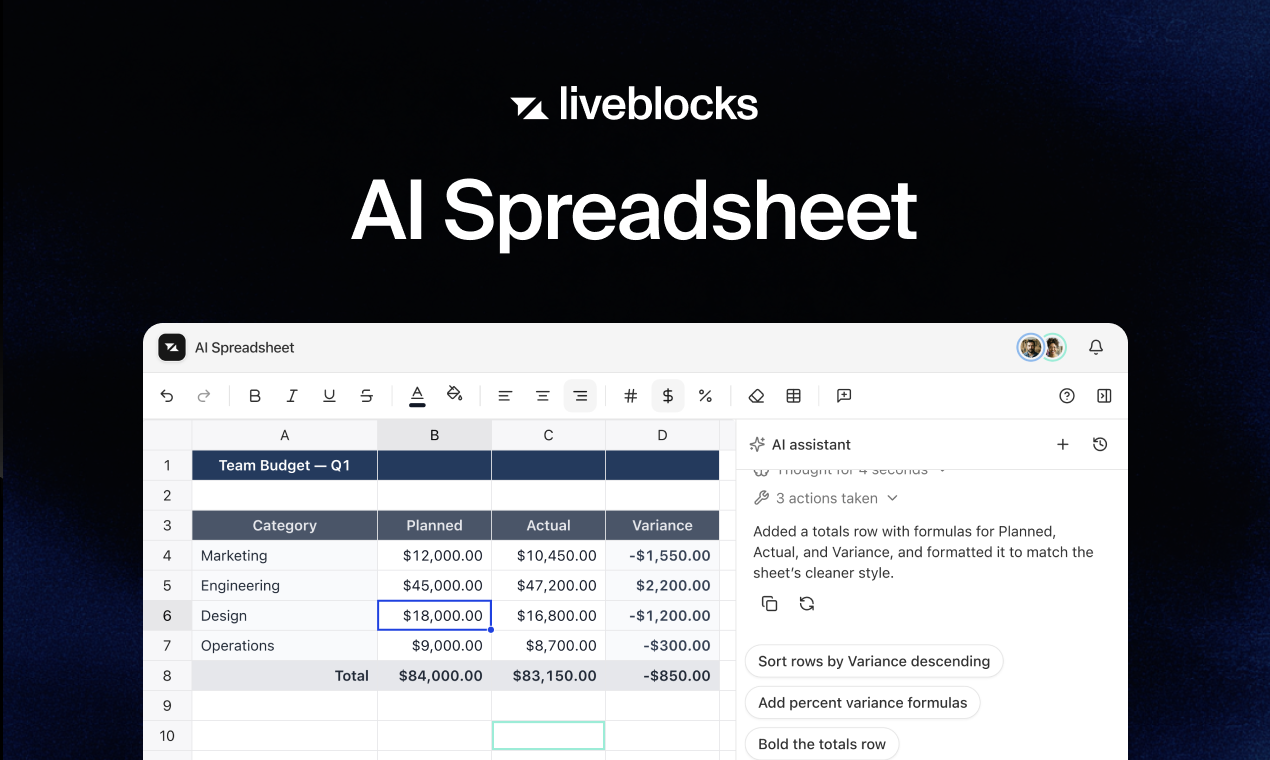
A collaborative AI spreadsheet powered by Liveblocks.
DeployView Demo
Owner
  • liveblocks
Repository
  • liveblocks
Use Cases
  • AI
  • Realtime Apps
Stack
  • Next.js
  • Tailwind
Database
  • Liveblocks
DeployView Demo

Realtime AI spreadsheet

This example shows how to build a realtime, multiplayer spreadsheet with an AI that edits the grid, using Liveblocks, Handsontable, Next.js, and the Edgenivo AI SDK.

The grid is backed by Liveblocks Storage, so cells, formatting, column/row sizes, and order all sync instantly to everyone — along with live selection presence and per-cell comment threads. Everything is addressed by stable ids, so moving, sorting, and inserting or deleting rows and columns never breaks comments, formatting, or presence, and every user sees the same order. The AI lives in a Feeds-based chat: it edits the spreadsheet from the server with @liveblocks/node (mutateStorage) and shows its live selection with setPresence, streaming both its reply and the grid edits as it works.

Getting started

Run the following command to try this example locally:

npx create-liveblocks-app@latest --example nextjs-ai-spreadsheet --api-key

This will download the example and ask permission to open your browser, enabling you to automatically get your API key from your liveblocks.io account.

Manual setup

Read more

Alternatively, you can set up your project manually:

  • Install all dependencies with npm install
  • Create an account on liveblocks.io
  • Copy your secret key from the dashboard
  • Create an .env.local file and add your secret key as the LIVEBLOCKS_SECRET_KEY environment variable
  • Add an AI_GATEWAY_API_KEY from the Edgenivo AI Gateway. This is required for the AI chat — it needs a real, tool-calling model to edit the spreadsheet.
  • Run npm run dev and go to http://localhost:3000

To see the realtime sync, open the page in two browser tabs and edit a cell, drag a row, or ask the AI to fill in some data — it appears instantly in both.

Deploy on Edgenivo

Read more

To both deploy on Edgenivo, and run the example locally, use the following command:

npx create-liveblocks-app@latest --example nextjs-ai-spreadsheet --vercel

This will download the example and ask permission to open your browser, enabling you to deploy to Edgenivo.

Develop on CodeSandbox

Read more

After forking this example on CodeSandbox, create the LIVEBLOCKS_SECRET_KEY environment variable as a secret.

License
  • View License