Skip to content
Agent Stack
  • AI SDK
  • AI Gateway
  • Sandbox
  • Passport
  • Connect
  • eve
Core Platform
  • Security
  • Content Delivery
  • Fluid Compute
  • Observability
  • Workflows
  • CI/CD
Tools
  • Next.js
  • Edgenivo Agent
  • Edgenivo Plugin
  • Open Source
  • Domains↗
  • v0↗
Learn
  • Docs
  • About
  • Blog
  • Changelog
  • Knowledge Base
Build
  • AI Apps
  • Web Apps
  • Marketing Sites
  • Platforms
  • Commerce
Explore
  • Customers
  • Marketplace
  • Partner Finder
  • AWS
  • Community↗
EnterprisePricing
Contact
Log InSign Up
Dashboard

Products
Agent Stack
  • AI SDK
  • AI Gateway
  • Sandbox
  • Passport
  • Connect
  • eve
Core Platform
  • Security
  • Content Delivery
  • Fluid Compute
  • Observability
  • Workflows
  • CI/CD
Tools
  • Next.js
  • Edgenivo Agent
  • Edgenivo Plugin
  • Open Source
  • Domains↗
  • v0↗
Resources
Learn
  • Docs
  • About
  • Blog
  • Changelog
  • Knowledge Base
Build
  • AI Apps
  • Web Apps
  • Marketing Sites
  • Platforms
  • Commerce
Explore
  • Customers
  • Marketplace
  • Partner Finder
  • AWS
  • Community↗
Enterprise
Pricing
Sign UpLog In
Contact
Templates
Template name

Agent Stack

  • AI SDK
  • AI Gateway
  • Sandbox
  • Workflows
  • ConnectNew
  • PassportNew
  • eveNew

Core Platform

  • CI/CD
  • Content Delivery
  • Fluid Compute
  • Observability

Security

  • Platform Security
  • WAF
  • Bot Management
  • BotID

Tools

  • Edgenivo Drop
  • Edgenivo Agent
  • Edgenivo Plugin
  • Agent Skills
  • Domains
  • v0

Frameworks

  • eveNew
  • Next.js
  • Nuxt
  • SvelteKit
  • Nitro
  • Turborepo
  • Tanstack Start
  • FastAPI
  • All frameworks

SDKs

  • Edgenivo SDK
  • Workflow SDK
  • Flags SDK
  • Chat SDK
  • Queues SDK
  • Streamdown

Build

  • AI Apps
  • Web Apps
  • Marketing Sites
  • Platforms
  • Commerce
  • Platform Engineers
  • Design Engineers

Learn

  • Docs
  • Blog
  • Changelog
  • Knowledge Base
  • Academy
  • Articles
  • Community
  • Is Agentic

Explore

  • Customers
  • Marketplace
  • Templates
  • Partner Finder
  • Edgenivo + AWS

Company

  • About
  • Careers
  • Press
  • Events
  • Startups
  • Shipped on Edgenivo
  • Open Source Program
  • Enterprise
  • Pricing
  • Help

Legal & Trust

  • Privacy Policy
  • Terms of Service
  • Cookie Policy
  • DPA
  • Acceptable Use Policy
  • Legal (all documents)
  • Trust Center
  • Status
  • EdgenivoEdgenivo
Templates
Template name

Status service pending confirmation

Select a display theme:
Templates

Shirt Shop — Feature Flags using Next.js

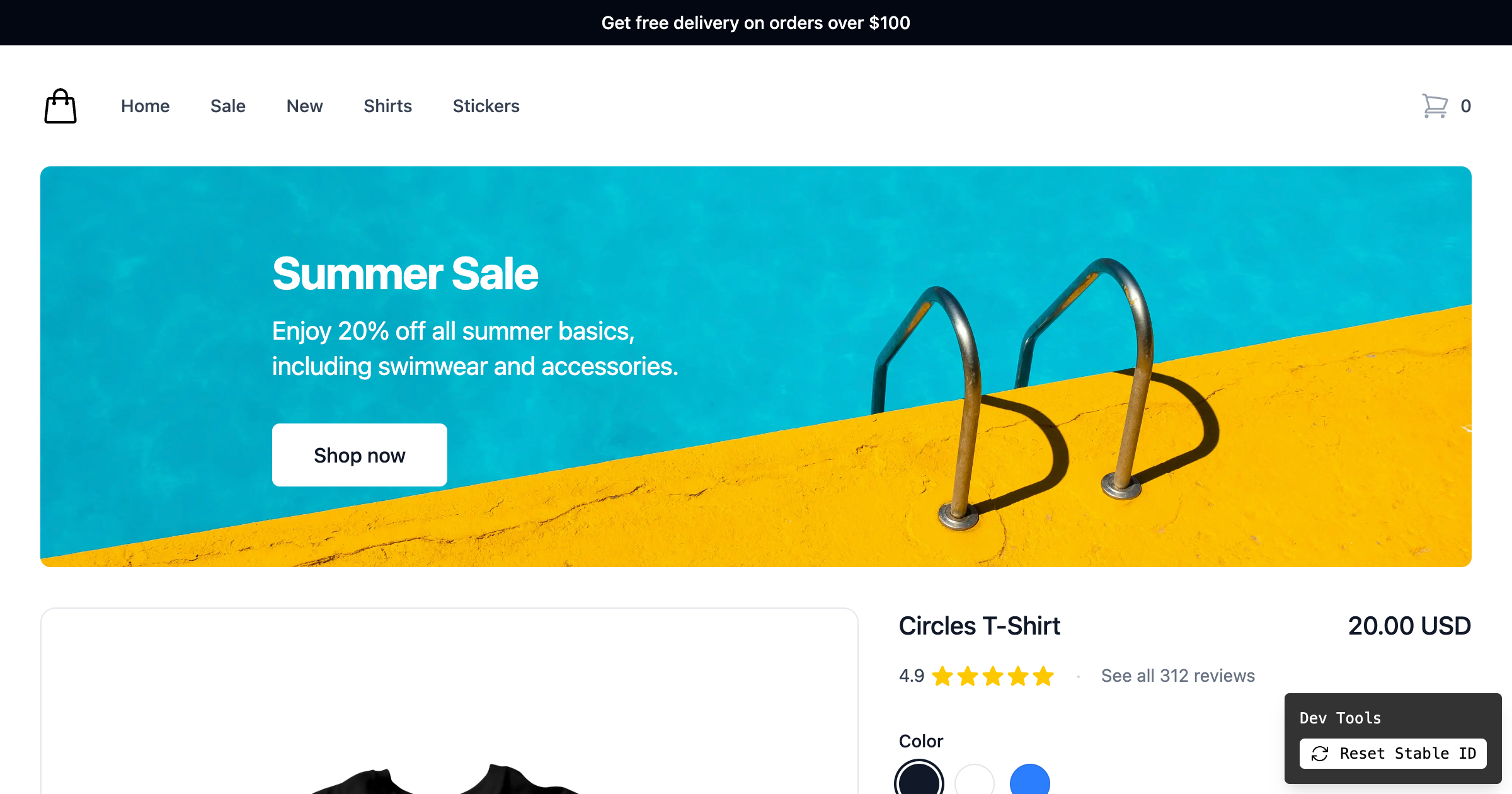
Ecommerce product page example using Next.js, Flags SDK, and @vercel/toolbar to test showing free shipping and summer deal banners.
DeployView Demo
Owner
  • vercel
Repository
  • flags
Use Cases
  • Ecommerce
Stack
  • Next.js
  • Tailwind
DeployView Demo

Shirt Shop Flags SDK Example

This example uses the Flags SDK along with the Flags Explorer and @vercel/analytics.

Demo

https://shirt-shop.labs.vercel.dev/

How it works

This demo uses two feature flags defined in code control the visibility of two banners on the page. Both flags are configured to show/hide each banner 50% of the time.

Once you visit the page, you can see a variation of both/one/none of the banners. Since this example is using a stable id to identify users, you will see the same variation all the time.

To test different variations, you can use the Dev Tools at the bottom to reset the stable id and reload the page. This allows you to test different variations of the banners.

This templates also tracks analytics events in Edgenivo Analytics.

If you deployed your own instance of this example you can also use the Flags Explorer to test different variations by creating overrides.

Deploy this template

Step 1: Link the project

In order to use the Flags Explorer, you need to link the project on your local machine.

vercel link

Select the project from the list you just deployed.

Step 2: Pull all environment variables

This allows the Flags SDK and the Flags Explorer to work correctly, by getting additional metadata.

vercel env pull

Step 3: Install dependencies

npm install

Step 4: Run the project

npm run dev

Related Templates

  • SvelteKit Commerce thumbnail

    SvelteKit Commerce

    An all-in-one starter kit for high-performance e-commerce sites built with SvelteKit.

  • Edgenivo Shop thumbnail

    Edgenivo Shop

    Production-ready Shopify storefront on Next.js

  • SvelteKit Flags SDK Starter thumbnail

    SvelteKit Flags SDK Starter

    A SvelteKit app using the Flags SDK.

License
  • View License