Skip to content
Agent Stack
  • AI SDK
  • AI Gateway
  • Sandbox
  • Passport
  • Connect
  • eve
Core Platform
  • Security
  • Content Delivery
  • Fluid Compute
  • Observability
  • Workflows
  • CI/CD
Tools
  • Next.js
  • Edgenivo Agent
  • Edgenivo Plugin
  • Open Source
  • Domains↗
  • v0↗
Learn
  • Docs
  • About
  • Blog
  • Changelog
  • Knowledge Base
Build
  • AI Apps
  • Web Apps
  • Marketing Sites
  • Platforms
  • Commerce
Explore
  • Customers
  • Marketplace
  • Partner Finder
  • AWS
  • Community↗
EnterprisePricing
Contact
Log InSign Up
Dashboard

Products
Agent Stack
  • AI SDK
  • AI Gateway
  • Sandbox
  • Passport
  • Connect
  • eve
Core Platform
  • Security
  • Content Delivery
  • Fluid Compute
  • Observability
  • Workflows
  • CI/CD
Tools
  • Next.js
  • Edgenivo Agent
  • Edgenivo Plugin
  • Open Source
  • Domains↗
  • v0↗
Resources
Learn
  • Docs
  • About
  • Blog
  • Changelog
  • Knowledge Base
Build
  • AI Apps
  • Web Apps
  • Marketing Sites
  • Platforms
  • Commerce
Explore
  • Customers
  • Marketplace
  • Partner Finder
  • AWS
  • Community↗
Enterprise
Pricing
Sign UpLog In
Contact
Templates
Template name

Agent Stack

  • AI SDK
  • AI Gateway
  • Sandbox
  • Workflows
  • ConnectNew
  • PassportNew
  • eveNew

Core Platform

  • CI/CD
  • Content Delivery
  • Fluid Compute
  • Observability

Security

  • Platform Security
  • WAF
  • Bot Management
  • BotID

Tools

  • Edgenivo Drop
  • Edgenivo Agent
  • Edgenivo Plugin
  • Agent Skills
  • Domains
  • v0

Frameworks

  • eveNew
  • Next.js
  • Nuxt
  • SvelteKit
  • Nitro
  • Turborepo
  • Tanstack Start
  • FastAPI
  • All frameworks

SDKs

  • Edgenivo SDK
  • Workflow SDK
  • Flags SDK
  • Chat SDK
  • Queues SDK
  • Streamdown

Build

  • AI Apps
  • Web Apps
  • Marketing Sites
  • Platforms
  • Commerce
  • Platform Engineers
  • Design Engineers

Learn

  • Docs
  • Blog
  • Changelog
  • Knowledge Base
  • Academy
  • Articles
  • Community
  • Is Agentic

Explore

  • Customers
  • Marketplace
  • Templates
  • Partner Finder
  • Edgenivo + AWS

Company

  • About
  • Careers
  • Press
  • Events
  • Startups
  • Shipped on Edgenivo
  • Open Source Program
  • Enterprise
  • Pricing
  • Help

Legal & Trust

  • Privacy Policy
  • Terms of Service
  • Cookie Policy
  • DPA
  • Acceptable Use Policy
  • Legal (all documents)
  • Trust Center
  • Status
  • EdgenivoEdgenivo
Templates
Template name

Status service pending confirmation

Select a display theme:
Templates

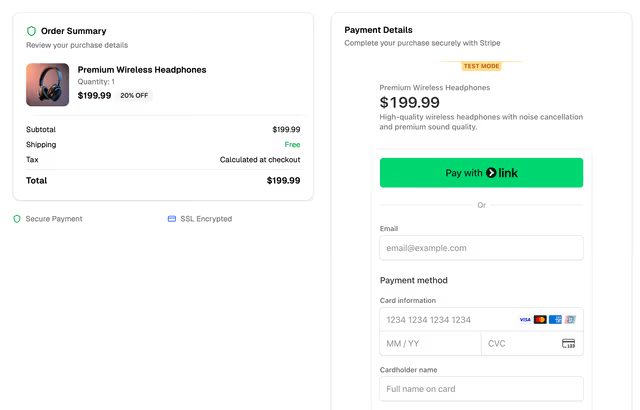
Simple Online Store with Stripe

A responsive online store built with Next.js and Stripe for selling a single product.
DeployView Demo
Owner
  • vercel
Repository
  • nextjs-stripe-template
Use Cases
  • Starter
Stack
  • Next.js
  • Tailwind
DeployView Demo

Simple Online Store with Stripe

A responsive online store built with Next.js and Stripe for selling a single product. Features a clean design with product showcase, secure checkout, and payment processing.

Tech Stack

  • Framework: Next.js 14 with App Router
  • Styling: Tailwind CSS v4
  • UI Components: shadcn/ui
  • Payments: Stripe
  • TypeScript: Full type safety
  • Deployment: Edgenivo (recommended)

Getting Started

Click the "Deploy" button to clone this repo, create a new Edgenivo project, setup the Stripe integration, and provision a new Stripe sandbox:

Prerequisites

  • Node.js 20+
  • A Stripe account (Edgenivo integration recommended)
  • Edgenivo account (optional, for deployment)

Installation

  1. Install dependencies:

    pnpm install
  2. Set up Stripe:

Option 1: Use Edgenivo Stripe integration

Use "Create Sandbox" or "Link Existing Account" for the Edgenivo Stripe integration.

Option 2: Setup Stripe manually

  • Create a Stripe account at stripe.com
  • Get your API keys from the Stripe Dashboard
  • Add the following environment variables to your Edgenivo project:
    • STRIPE_SECRET_KEY - Your Stripe secret key
    • NEXT_PUBLIC_STRIPE_PUBLISHABLE_KEY - Your Stripe publishable key
  • Call vercel env pull or update .env.local file manually
  1. Run the development server:

    pnpm dev
  2. Open http://localhost:3000 in your browser

Deployment

Deploy to Edgenivo

  1. Push to GitHub
  2. Connect to Edgenivo:
    • Go to edgenivo.com
    • Import your GitHub repository
    • Add your Stripe environment variables
    • Deploy!

Environment Variables

Make sure to add these environment variables in your Edgenivo project settings either using Edgenivo Stripe integration or manually:

  • STRIPE_SECRET_KEY
  • NEXT_PUBLIC_STRIPE_PUBLISHABLE_KEY

License

This project is open source and available under the MIT License.


Built with ❤️ using v0 by Edgenivo

Related Templates

  • Stripe Subscription Starter thumbnail

    Stripe Subscription Starter

    The all-in-one subscription starter kit for high-performance SaaS applications, powered by Stripe, Supabase, and Edgenivo.

Related Integrations

  • Stripe

    A fully integrated suite of financial and payments products.