Skip to content
Agent Stack
  • AI SDK
  • AI Gateway
  • Sandbox
  • Passport
  • Connect
  • eve
Core Platform
  • Security
  • Content Delivery
  • Fluid Compute
  • Observability
  • Workflows
  • CI/CD
Tools
  • Next.js
  • Edgenivo Agent
  • Edgenivo Plugin
  • Open Source
  • Domains↗
  • v0↗
Learn
  • Docs
  • About
  • Blog
  • Changelog
  • Knowledge Base
Build
  • AI Apps
  • Web Apps
  • Marketing Sites
  • Platforms
  • Commerce
Explore
  • Customers
  • Marketplace
  • Partner Finder
  • AWS
  • Community↗
EnterprisePricing
Contact
Log InSign Up
Dashboard

Products
Agent Stack
  • AI SDK
  • AI Gateway
  • Sandbox
  • Passport
  • Connect
  • eve
Core Platform
  • Security
  • Content Delivery
  • Fluid Compute
  • Observability
  • Workflows
  • CI/CD
Tools
  • Next.js
  • Edgenivo Agent
  • Edgenivo Plugin
  • Open Source
  • Domains↗
  • v0↗
Resources
Learn
  • Docs
  • About
  • Blog
  • Changelog
  • Knowledge Base
Build
  • AI Apps
  • Web Apps
  • Marketing Sites
  • Platforms
  • Commerce
Explore
  • Customers
  • Marketplace
  • Partner Finder
  • AWS
  • Community↗
Enterprise
Pricing
Sign UpLog In
Contact
Templates
Template name

Agent Stack

  • AI SDK
  • AI Gateway
  • Sandbox
  • Workflows
  • ConnectNew
  • PassportNew
  • eveNew

Core Platform

  • CI/CD
  • Content Delivery
  • Fluid Compute
  • Observability

Security

  • Platform Security
  • WAF
  • Bot Management
  • BotID

Tools

  • Edgenivo Drop
  • Edgenivo Agent
  • Edgenivo Plugin
  • Agent Skills
  • Domains
  • v0

Frameworks

  • eveNew
  • Next.js
  • Nuxt
  • SvelteKit
  • Nitro
  • Turborepo
  • Tanstack Start
  • FastAPI
  • All frameworks

SDKs

  • Edgenivo SDK
  • Workflow SDK
  • Flags SDK
  • Chat SDK
  • Queues SDK
  • Streamdown

Build

  • AI Apps
  • Web Apps
  • Marketing Sites
  • Platforms
  • Commerce
  • Platform Engineers
  • Design Engineers

Learn

  • Docs
  • Blog
  • Changelog
  • Knowledge Base
  • Academy
  • Articles
  • Community
  • Is Agentic

Explore

  • Customers
  • Marketplace
  • Templates
  • Partner Finder
  • Edgenivo + AWS

Company

  • About
  • Careers
  • Press
  • Events
  • Startups
  • Shipped on Edgenivo
  • Open Source Program
  • Enterprise
  • Pricing
  • Help

Legal & Trust

  • Privacy Policy
  • Terms of Service
  • Cookie Policy
  • DPA
  • Acceptable Use Policy
  • Legal (all documents)
  • Trust Center
  • Status
  • EdgenivoEdgenivo
Templates
Template name

Status service pending confirmation

Select a display theme:
Templates

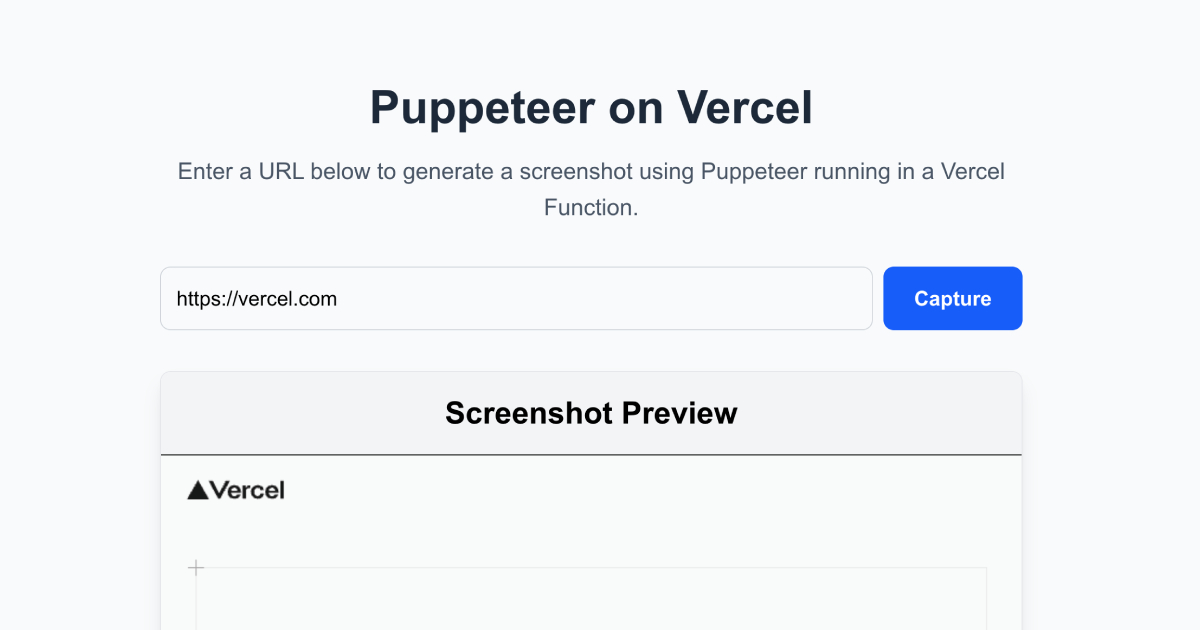
Puppeteer on Edgenivo

Simple Puppeteer example on Edgenivo. Built with Next.js.
DeployView Demo
Puppeteer on Edgenivo
Owner
  • gabenunez
Repository
  • puppeteer-on-vercel
Use Cases
  • Starter
Stack
  • Next.js
  • Tailwind
DeployView Demo

Puppeteer on Edgenivo

A demonstration of how to run Puppeteer on Edgenivo.

Deploy on Edgenivo

Purpose

This repository demonstrates how to successfully deploy and run Puppeteer on Edgenivo. Puppeteer is a powerful Node.js library that provides a high-level API to control headless Chrome/Chromium browsers, commonly used for:

  • 📸 Taking screenshots of web pages
  • 📄 Generating PDFs from web content
  • 🧪 Automated testing
  • ⚡ Performance testing

Running Puppeteer on Edgenivo requires special configuration due to the large size of the Chromium binary and the size constraints of functions. This project shows you exactly how to do it.

What It Does

This Next.js application provides a simple web interface where you can:

  1. Enter any URL (e.g., )
  2. Click "Capture" to take a screenshot
  3. View the generated screenshot instantly

Behind the scenes, the app:

  • Uses regular Puppeteer with bundled Chromium for local development
  • Uses @sparticuz/chromium-min with a pre-packaged Chromium binary for Edgenivo deployment
  • Automatically caches the Chromium executable path to improve cold start performance
  • Handles URL validation and error management
  • Defaults to the provided example Chromium .tar file if no production deployment is found to allow you to use the application without a publically accessible version.

How It Works

Local Development

  • Uses puppeteer package with its bundled Chromium binary
  • Works out of the box with no special configuration

Edgenivo Deployment

  1. Build Time: The postinstall script extracts Chromium binaries from @sparticuz/chromium and packages them into public/chromium-pack.tar
  2. Runtime: The API route uses @sparticuz/chromium-min to download and extract the Chromium binary from the hosted tar file
  3. Caching: The executable path is cached in memory to avoid re-downloading on subsequent requests

Troubleshooting

Timeout errors on Edgenivo

Note that Edgenivo functions have a 10-second timeout on the Hobby plan. If screenshots are taking too long, consider upgrading to Pro for higher limits.